Material guide
How to Choose the Best PETG Filament for 3D Printing
From planning to printing
Find material for your next print
Compare current colors, prices, and setup requirements before choosing a spool for your project.
Share this guide
Get the article link

Last Updated: October 26, 2026
Quick Summary
The best PETG filament for 3D printing is the spool that extrudes consistently from first meter to last, holds a tight diameter tolerance, and arrives vacuum sealed with desiccant. LineBoss PETG is listed at +/-0.02mm and is described as a strong everyday choice for functional prints.
- Ask for the diameter tolerance figure in writing and confirm it applies across the whole spool.
- PETG absorbs moisture, so wet filament prints with popping, rough surfaces, and weak layers.
- LineBoss PETG is described as stronger than PLA and easier than ABS, with water resistance for outdoor use.
- Dry the filament first when reducing stringing, then run a temperature tower at the low end of the maker's range.
- Standard PETG is the safest default for functional parts on stock printers and beginners.
Table of Contents
- What Separates Good PETG Filament From the Rest
- PETG vs PLA and Other Filament Types for Functional Parts
- PETG Filament Temperature Settings That Actually Work
- How to Reduce PETG Stringing Without Wrecking Layer Adhesion
- PETG HF vs PETG: Which Formulation Fits Your Printer
- Drying PETG Filament and Keeping It Dry
- Matching PETG to the Job: Functional Parts, Outdoor Use, and Cosplay
- Picking Your Next Spool of PETG
- Frequently Asked Questions
What Separates Good PETG Filament From the Rest
The best PETG filament for 3D printing is the spool that extrudes the same way from the first meter to the last, holds its diameter tightly, and arrives dry. This guide walks through the criteria that actually predict print results, the settings that matter, and the mistakes that waste spools.
LineBoss PETG combines PLA-like ease of printing with high impact resistance and excellent layer adhesion. It is described as a strong everyday choice for brackets, jigs, fixtures, organizers, and other functional prints.
Two specs decide whether a spool behaves.
Diameter Tolerance and Spool-to-Spool Consistency
Diameter tolerance is the allowed variation in filament width across a spool. A tight tolerance means the slicer's flow calculation stays accurate, so extrusion stays even from start to finish.
Loose tolerance shows up as inconsistent walls, blobs, and unpredictable first layers. When comparing spools, ask for the tolerance figure in writing and check that it applies across the whole spool, not just a sample. LineBoss PETG is listed at +/-0.02mm.
Packaging, Desiccant, and Moisture Risk
Vacuum sealing with desiccant is the cheapest quality signal a filament brand can offer. PETG absorbs moisture from the air, and wet filament prints with steam pockets that cause popping, rough surfaces, and weak layers.
A spool that arrives soft, unsealed, or without desiccant has likely been sitting in humid air. Treat packaging as a spec, not an afterthought.
PETG vs PLA and Other Filament Types for Functional Parts
LineBoss PETG is described as stronger than PLA and easier than ABS, with water resistance for outdoor use. For a deeper comparison of strength, heat resistance, and outdoor use, see Choosing Between PLA and PETG.
| Material | Strength | Heat Resistance | Print Difficulty | Best For |
|---|---|---|---|---|
| PLA | High stiffness, brittle | Low | Easiest | Display models, prototypes |
| PETG | Tough, impact resistant | Moderate | Easy to moderate | Brackets, jigs, outdoor parts |
| ABS | Tough | High | Hard, warps | Enclosures, automotive |
| ASA | Tough, UV stable | High | Hard, warps | Outdoor, long-term sun exposure |
| TPU | Flexible | Moderate | Slow, tricky | Grips, gaskets, cosplay |
PETG Filament Temperature Settings That Actually Work
There is no universal PETG temperature. Every formulation and every hotend behaves differently, so treat any number as a starting point and calibrate from there.
Why PETG Settings Vary by Formulation
PETG is a copolyester, and makers adjust the glycol modification, molecular weight, and additive package to hit different targets. A high-flow (HF) grade is formulated to melt and flow more readily at a given temperature, which is why it can print faster on a high-flow hotend but can also string more aggressively if you push it. A standard grade is usually more forgiving of slower melt zones. A high-strength or impact-modified grade may need a slightly higher nozzle temperature to develop layer adhesion. That is why the manufacturer's stated band for your specific spool is the only authoritative starting point.
Starting Ranges to Test Within
Use these as orientation only, then narrow to the maker's published band for your spool:
- Nozzle: start at the low end of the manufacturer's stated band and step up in small increments. Lower nozzle temperature usually reduces stringing; too low hurts layer adhesion and surface finish.
- Bed: warm enough for first-layer adhesion without squashing the first layer. Too hot a bed can cause elephant's foot and glossy blobs at the base.
- Cooling fan: low to moderate. PETG relies on layer-to-layer bonding, and aggressive part cooling is a common cause of weak layers and poor interlayer strength.
- Speed: moderate. PETG does not like being rushed; volumetric flow limits on your hotend matter more than the slicer's speed number.
- Retraction: hardware-dependent. Direct-drive and Bowden setups need very different values, so there is no universal figure. Tune in small increments and test after each change.
A Calibration Order That Changes One Variable at a Time
See the slicer settings resource and the 3D printing cost calculator.
How to Reduce PETG Stringing Without Wrecking Layer Adhesion
Stringing is PETG's signature flaw, and the fix is a sequence, not a single setting. Work through it in order so you change one variable at a time.
- Dry the filament first. Wet filament strings no matter what retraction you use.
- Run a temperature tower. Print at the low end of the maker's range first.
- Tune retraction distance and speed in small increments, testing after each change.
- Increase travel speed so the nozzle moves away faster.
- Enable travel moves outside the model where your slicer supports it.
Retraction values are hardware-dependent. Direct-drive and Bowden setups need very different numbers, so a universal figure does not exist. A repeatable stringing and drying workflow with a printable test log keeps the process honest.
PETG HF vs PETG: Which Formulation Fits Your Printer
Most buying guides treat PETG as one material. In practice, makers sell several formulations under the PETG name, and the formulation you pick should follow your printer's hotend and the job the part has to do. This section separates the common formulations by use case so you can match the spool to the printer instead of guessing.
The Common PETG Formulations
- Standard PETG: the baseline copolyester. It is the most forgiving of slower hotends, the best documented, and the safest default for functional parts on stock printers.
- PETG HF (high flow): formulated to melt and flow more readily at a given temperature. It suits printers with high-flow hotends and users who prioritize speed, but it can string more aggressively if temperature and retraction are not tuned.
- High-strength or impact-modified PETG: formulated for tougher parts. It may need a slightly higher nozzle temperature within the maker's band to develop full layer adhesion, and it is worth testing one spool before committing to a batch.
Match the Formulation to the Job
- Beginners and stock printers: standard PETG. Its behavior is better documented and it tolerates slower melt zones.
- High-speed printing on a high-flow hotend: PETG HF is worth testing, one spool at a time.
- Functional parts under load: a high-strength grade, calibrated within the maker's stated band.
- Outdoor parts: standard or high-strength PETG handles water and mild weather; long-term UV exposure still favors ASA.
- Budget buying: standard PETG usually gives the most predictable results per spool, which matters more than a headline speed claim.
The Hardware Dependency Nobody Mentions
For settings information, see the slicer settings resource, and use the cost calculator.
Drying PETG Filament and Keeping It Dry
PETG should be dried before use if it has been exposed to humid air, and stored dry between prints. A dedicated filament dryer is the controlled way to do it.
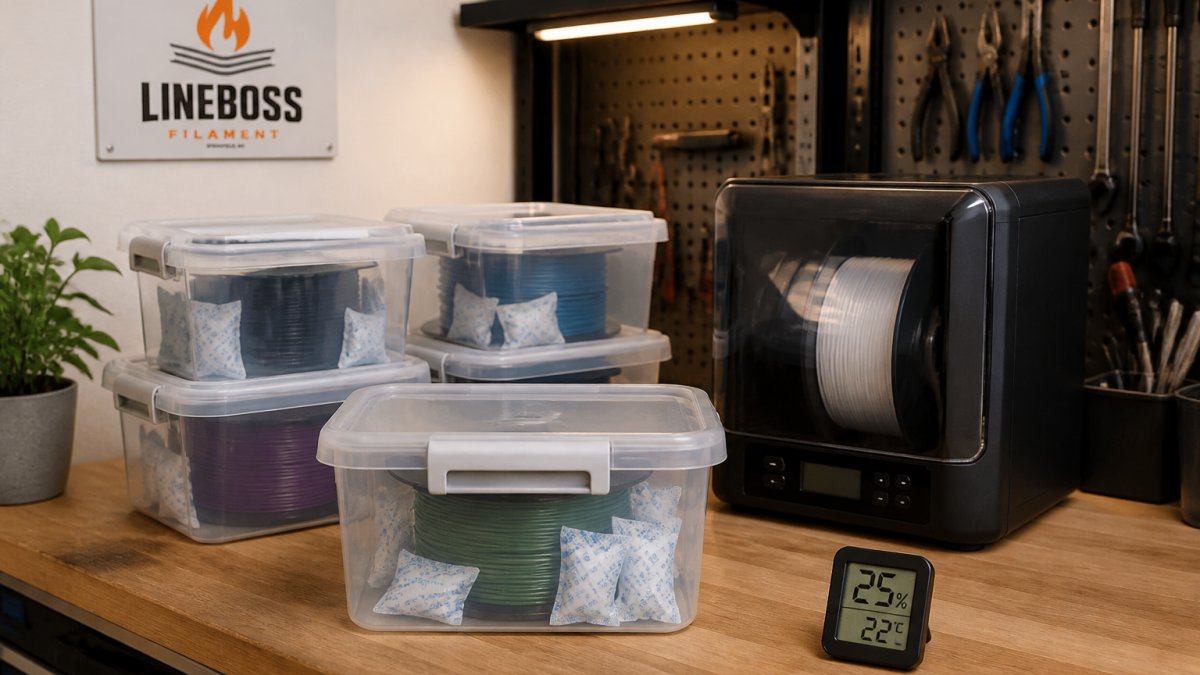
Skip kitchen-oven drying.
Matching PETG to the Job: Functional Parts, Outdoor Use, and Cosplay
Match the material to the load and the environment, not the other way around. PETG covers a wide middle ground, and knowing where it stops saves failed prints.
- Functional parts and jigs: PETG's impact resistance and layer adhesion suit brackets, fixtures, and organizers.
- Outdoor use: PETG handles water and mild weather, though long-term UV exposure favors ASA.
- Cosplay: PETG takes paint and sanding well and survives knocks; TPU covers flexible pieces.
- High-heat environments: step up to ABS or ASA rather than pushing PETG past its limits.
Picking Your Next Spool of PETG
LineBoss PETG is 1.75mm in diameter, vacuum sealed with desiccant, and supported with product-specific setup help. Browse LineBoss PETG Filament for functional prints. Browse LineBoss PETG Filament for functional prints.

Frequently Asked Questions
What should I look for when choosing PETG filament?
LineBoss Filament specifies a +/-0.02mm diameter tolerance. LineBoss PETG is vacuum sealed with desiccant and has product-specific setup support.
Does PETG filament need to be dried before printing?
Newly opened spools that shipped vacuum sealed usually print fine straight out of the bag. PETG absorbs moisture from the air over time, and wet filament shows up as excess stringing, popping sounds at the nozzle, and weaker layer adhesion. If a spool has been open for weeks in a humid room, dry it before a critical print, then store it sealed with desiccant. Follow your dryer manufacturer's temperature guidance rather than improvising.
What nozzle and bed temperatures work for PETG?
The exact settings depend on your printer and material. See the [slicer settings resource](https://linebossfilament.com/pages/slicer-settings) for setup information.
How do I reduce stringing when printing PETG?
Stringing comes from oozing during travel moves. Increase travel speed, enable retraction with a distance and speed suited to your extruder type, and lower nozzle temperature slightly within the maker's range. Dry filament first, because moisture makes stringing worse. Print a small retraction test tower and change one setting per run. Direct-drive and Bowden setups need different retraction values, so copy numbers from another printer only as a starting point.
The hardest part of PETG is not buying it, it is dialing in a new spool without wasting filament on failed tests. LineBoss Filament supports that step with tight +/-0.02mm diameter tolerance, vacuum-sealed spools with desiccant, and product-specific setup guidance for tuning. Get started with LineBoss Filament and print functional parts with fewer restarts.
