Material guide
How to Compare Filament Consistency: A Testing Guide
Share this guide
Get the article link

Table of Contents
- Why Filament Consistency Decides Print Quality
- How to Measure Filament Diameter at Multiple Points
- 3D Printer Filament Diameter Tolerance: What the Numbers Mean
- How to Test 3D Printer Filament With a Controlled Print
- Filament Color Consistency Between Rolls and Batches
- Spool-to-Spool and Batch Variation: Setting Pass/Fail Criteria
- Moisture and Storage: The Confounding Factor in Every Comparison
- Matching Material Type to Your Consistency Needs
- Frequently Asked Questions
Last Updated: October 19, 2026
Why Filament Consistency Decides Print Quality
Filament consistency is how steadily a spool holds its diameter, roundness, color, and material behavior from start to finish.
Most defects blamed on "bad filament" trace back to variation, not the material.
This guide from LineBoss Filament covers a repeatable way to compare filament consistency: measuring diameter, testing with a controlled print, and judging spool-to-spool results fairly.

How to Measure Filament Diameter at Multiple Points
Measure filament diameter with a calibrated digital caliper at several points along a strand, then compare the spread. Single readings prove nothing. The pattern across many readings is the data.
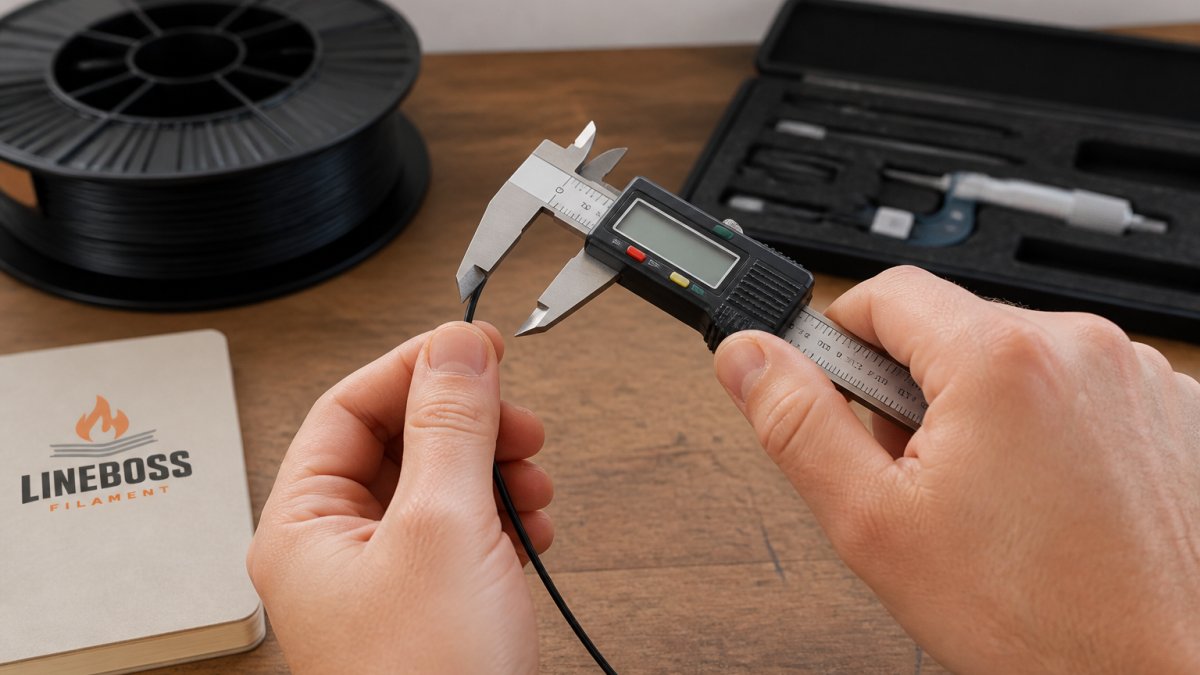
A common mistake is measuring only the first meter of a new spool, which is often the most protected.
- Sample at least 10 points spread across a few meters
- Take three readings at each point, rotating the strand
- Log every number, including the outliers
Write the readings down; you cannot compare batches you did not document.
Calibrating Your Caliper Before You Measure
Zero the caliper before every session and check it against a known reference.
Close the jaws fully and confirm zero, then measure a gauge block or feeler gauge of known thickness. If the caliper disagrees with the reference, recalibrate or replace it.
Cheap calipers drift. Note the tool's resolution and treat smaller differences as noise, not a real finding.
Measuring Ovality in Perpendicular Orientations
Filament ovality is the difference between the widest and narrowest diameter of the same cross-section.
A round strand feeds evenly through the extruder gears; an oval one grips unevenly, showing up as inconsistent extrusion and banding.
Record both readings per point; the gap is your ovality figure and belongs in the same log as your diameter data.
3D Printer Filament Diameter Tolerance: What the Numbers Mean
Filament diameter tolerance is the allowed range around the nominal size. A stated tolerance of +/-0.02 mm means the strand should stay within that band across the spool.
A tolerance figure is only useful if you compare your readings against it correctly: separate real variation from measurement noise, then summarize the spread in a way you can act on.
Distinguishing Real Variation From Measurement Error
Before calling a spool out of tolerance, establish your measurement uncertainty. A digital caliper's resolution, commonly 0.01 mm, is not accuracy; jaw flex, user pressure, and zero drift add error on top.
A practical approach:
- Zero the caliper and confirm it against a known reference before each session.
- Take three readings at the same point, rotating the strand between readings.
- Treat differences smaller than your tool's reliable resolution as noise, not as a finding.
NIST publishes general guidance on expressing measurement uncertainty; the principle that matters is that a reported value without an uncertainty statement is incomplete. In your log, record the tool, its resolution, and whether you calibrated it that session.
Summarizing the Spread: Mean, Range, and Standard Deviation
A single diameter reading tells you almost nothing. Summarize the set:
- Mean: the average of all readings. Compare it to the nominal size (typically 1.75 mm).
- Range: the highest reading minus the lowest. This is the fastest check against a stated tolerance band.
- Standard deviation: how tightly readings cluster around the mean. A small standard deviation means the strand holds steady; a large one means it drifts even if every reading is technically inside tolerance.
A common pattern: a spool whose mean sits near nominal and whose range stays inside the stated band, yet whose standard deviation is noticeably higher than a reference spool. It will still print, but expect more extrusion variation than the tolerance figure alone suggests.
Reading Ovality Alongside Diameter
Record both perpendicular readings at each point and report ovality next to your diameter data. A strand can pass a diameter check and still be oval enough to grip unevenly in the extruder gears, causing banding and inconsistent extrusion.
A Material-by-Material Starting Point
Material type changes which consistency challenge you should watch first:
| Material | Typical Consistency Challenge | What to Watch |
|---|---|---|
| PLA | Diameter drift between batches | Measure every new spool |
| PETG | Moisture pickup and stringing | Dry before test printing |
| ABS | Shrinkage and warping | Control chamber temperature |
| TPU | Flexible strand, harder to measure | Use light caliper pressure |
| ASA | Warping on large parts | Enclosure and stable cooling |
LineBoss Filament spools are listed at +/-0.02 mm diameter tolerance and arrive vacuum sealed with desiccant. That gives you a documented starting point for a fair comparison, pair it with your own mean, range, and standard deviation so the tolerance figure is backed by data.

How to Test 3D Printer Filament With a Controlled Print
Test 3D printer filament with a sample print using identical settings, geometry, and ambient conditions for every spool.
Print the same small model from each spool in sequence, keeping nozzle, layer height, and cooling fixed. Label each part with its spool.
- Print a calibration cube or a small test coupon
- Record surface finish, layer lines, and corner quality
- Check dimensional accuracy with the same caliper
The goal is a fair comparison, not a perfect print. A slightly rough part that repeats identically across spools beats one great print you cannot reproduce.
Designing a Sample Print That Exposes Variation
A good test print stresses where inconsistent filament shows up first: sharp corners reveal extrusion swings, tall thin walls reveal diameter drift, and fine text reveals over-extrusion.
Use a model with these features:
- A tall vertical wall at least 40 mm high
- Sharp 90-degree corners
- Small gaps and fine detail
Skip decorative models. They hide problems under complex surfaces. Simple geometry makes variation obvious.
Filament Color Consistency Between Rolls and Batches
Filament color consistency between rolls is the match in hue, saturation, and opacity from one spool to the next.
Pigment loading affects more than looks: a batch with heavier pigment can print slightly differently, and dye recipe changes between runs show up as visible seams on large assemblies.
Compare color under the same light source. Daylight and shop lighting render color differently, and a mismatch obvious outdoors can vanish under a warm bulb.
- Line up samples from each spool side by side
- Check under daylight and under your print room lighting
- Note any shift in gloss or translucency, not just hue
Matte and gloss read differently even in the same color. LineBoss Matte PLA carries a frosted texture by design, so compare it against another matte spool, not a gloss one.

Spool-to-Spool and Batch Variation: Setting Pass/Fail Criteria
Spool-to-spool consistency is variation between individual rolls; batch variation is drift between production runs. Both need a written standard before you test, or every result becomes a judgment call. Decide what counts as a pass before you open the box.
A Repeatable Sampling Protocol
A comparison is only fair if every spool is sampled the same way. Use this sequence per roll:
- Pull two to three meters off the spool first. The outer wraps are often the most protected and least representative.
- Mark ten sampling points spread across the next few meters.
- At each point, take three diameter readings, rotating the strand between readings.
- At each point, also take a perpendicular reading to capture ovality.
- Log every number with the spool identifier and batch number.
This protocol is what most comparisons skip. Without it, you compare a protected outer wrap on one spool against a mid-roll section on another, and the numbers mean nothing.
Calculating Your Pass/Fail Metrics
Turn the logged readings into four numbers per spool:
- Mean diameter: average of all readings; compare to nominal.
- Range: highest minus lowest reading; the fastest tolerance check.
- Standard deviation: how tightly readings cluster; catches drift that stays inside tolerance.
Then apply criteria you wrote down in advance. A workable starting framework:
- Diameter: every reading inside the maker's stated tolerance
- Range: no wider than the tolerance band allows
- Standard deviation: no higher than your reference spool's
Tracking Lots Over Time
A single comparison tells you about one order. A log tells you whether a supplier holds quality across many. For print farms and production runs, track results over months with a simple spreadsheet containing:
- Spool and batch identifiers
- Date received and date tested
- Mean, range, standard deviation, and ovality
Review the log periodically rather than spool by spool. A slow upward drift in standard deviation is easy to miss in one test but obvious in a trend line.
Separating Batch Drift From Moisture
Before attributing a failed comparison to batch variation, rule out moisture. Wet filament prints differently from dry filament of the same batch, so moisture can masquerade as a consistency problem.
For slicer guidance when setting up controlled test prints, see the slicer settings resource, and to weigh material costs against part output, use the 3D printing cost calculator.
ASTM standard test methods for filament and plastics NIST guidance on measurement uncertainty
Moisture and Storage: The Confounding Factor in Every Comparison
Moisture is the variable that ruins more filament comparisons than any other.
Signs of absorbed moisture include popping or crackling at the nozzle, excess stringing, rough surface finish, and weak layer adhesion. PETG and TPU pick up moisture readily.
Control for it before you test:
- Store spools sealed with desiccant between sessions
- Dry filament using a dedicated filament dryer, following the material maker's guidance
- Test spools in similar moisture states
Never dry filament in a kitchen oven; ovens overshoot and cycle unevenly, and temperature swings can deform a spool or fuse the strands.
Matching Material Type to Your Consistency Needs
Material type sets what consistency means for your project. PLA, PETG, and ABS fail in different ways, so the test you prioritize changes with the material.
For display models and prototypes, color and surface finish matter most. For outdoor parts, ASA brings UV and weather resistance, and its higher heat tolerance changes how you store and test it.
A quick way to match material to need:
- Detailed display work: LineBoss PLA or Matte PLA for crisp detail and a controlled finish
- Functional parts and jigs: LineBoss PETG for layer adhesion and low warping
- Tough prototypes: LineBoss PLA+ for impact resistance over standard PLA
Every LineBoss spool ships vacuum sealed with desiccant, and the team provides starting profiles and tuning help so your baseline settings are repeatable. For slicer guidance, see the slicer settings resource, and to weigh material costs against part output, use the 3D printing cost calculator.
ASTM standard test methods for filament and plastics
NIST guidance on measurement uncertainty
Frequently Asked Questions
What filament diameter variation is acceptable for 3D printing?
Most 1.75 mm filament is sold with a stated tolerance, and LineBoss publishes +/-0.02 mm across its PLA, PETG, TPU, ABS, and ASA lines. Whether a given variation matters depends on your nozzle size and the part: a 0.4 mm nozzle and a fine detail print will show diameter swings that a 0.6 mm nozzle on a rough bracket will not. Record your own readings across several meters, compare them to the maker's stated tolerance, and treat anything outside that band as a reason to re-measure before you blame your slicer profile.
How do you measure 3D printer filament diameter consistently?
Zero your caliper, then take readings at even intervals along at least two meters of filament, rotating the caliper 90 degrees at each point to catch ovality. Log every reading rather than just the average, because a spool that averages 1.75 mm can still swing wide between points. Keep the same caliper, the same pressure on the jaws, and the same measuring points for every spool you compare so the numbers are actually comparable. Repeat the set on a second spool from the same batch to see batch variation.
How can moisture affect filament consistency and print quality?
Moisture is the most common reason two spools of the same material print differently. Wet filament can pop, hiss, and extrude unevenly, which looks like a diameter or tolerance problem but is really a storage problem. Before you compare brands or batches, dry both spools the same way and store them in sealed containers with desiccant. LineBoss ships every spool vacuum sealed with desiccant for exactly this reason. If one spool was left on an open printer for weeks and the other stayed sealed, you are comparing storage, not filament.
What settings should stay the same when comparing filament brands?
Hold nozzle temperature, bed temperature, print speed, layer height, cooling, and retraction constant across every spool in the test, and change only the filament. Use the material maker's starting profile as your baseline rather than a universal number, since temperature and retraction depend on your hotend, nozzle, and material. Print the same model, on the same machine, in the same orientation. If you must adjust a setting to get a spool to print at all, note it, because that adjustment is itself a consistency finding worth recording in your log.
Comparing filament consistency comes down to discipline: calibrate the tool, sample widely, control moisture, and write down every number. Most makers skip the log, then blame the spool when a print fails.
LineBoss Filament makes that comparison easier to start. Every spool is held to +/-0.02 mm diameter tolerance, vacuum sealed with desiccant, and backed by product-specific setup support. Shop LineBoss filament and give your next consistency test a documented baseline.